Using the Editor (TinyMCE)
December 28, 2025
✏️ Editor Overview
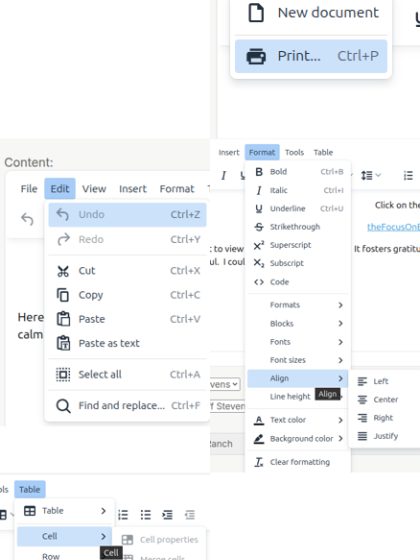
The editor toolbar provides tools for formatting your story content, adding links, and organizing text.
Common features include:
- File / Edit menus for basic actions
- Formatting tools (bold, italic, alignment)
- Insert options for links and tables
- Table tools for structured content
What You’ll Use Most
Basic Formatting
- Bold (B) → Highlight important text
- Italic (I) → Add emphasis
- Underline → Use sparingly
Text Alignment
- Left (default)
- Center → Good for titles or images
- Right / Justify → Use occasionally
Lists
- Bullet lists → For simple points
- Numbered lists → For steps
Links 🔗
Use the link button to:
- Connect to another story
- Add external links
👉 This is one of the most useful features.
Undo / Redo
- Undo mistakes quickly
- Redo if needed
Optional Features (Use When Needed)
Tables
Useful for organizing structured information.
Text Color & Formatting
Can be used to enhance content—but keep it simple and readable.
Best Practices
- Keep formatting clean and consistent
- Don’t overuse colors or styles
- Use links to connect related content
- Break content into short paragraphs for readability
Simple Rule
👉 If it looks clean and easy to read, you’re doing it right.
Final Thought
The editor is a tool to support your story—not the focus of it.
Clear content always matters more than complex formatting.
Posted in resources by Uber Admin